Image: Patryk Sobczak / Wikimedia Commons (CC0)
Small teams rarely fail because people are lazy. They stumble because work arrives faster than anyone can sort it, priorities shift without warning, and nobody is quite sure who owns what. A project management method is simply an agreed way of answering three questions: what are we working on, who is doing it, and when will it be done. The method you pick shapes how your team plans, how it communicates, and how it reacts when a client changes their mind on a Thursday afternoon.
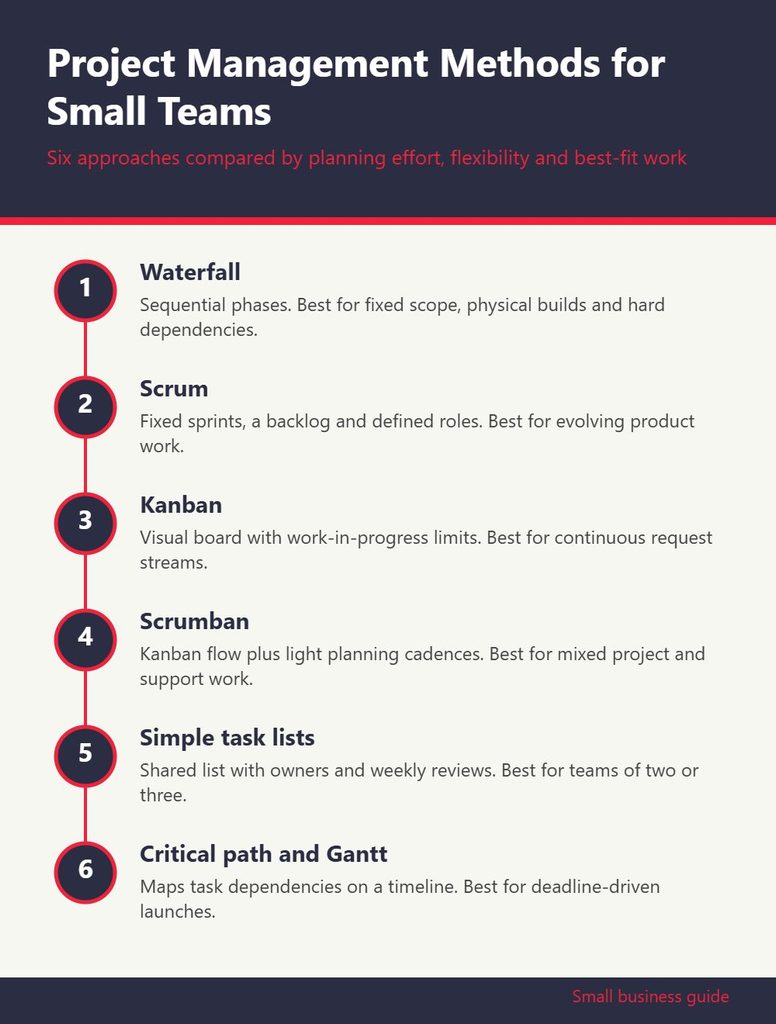
There is no single best method. A five-person agency, a two-founder software startup and a family-run construction business all need different levels of structure. The infographic below compares six widely used approaches by how much planning they require, how well they handle change, and what kind of work they suit best. The sections that follow explain each one in practical terms so you can choose with confidence.
1. Waterfall: Plan First, Then Build
Waterfall is the classic sequential approach. You define requirements, design the solution, carry out the work, test it and deliver it, with each phase finishing before the next begins. It gets criticized in software circles, but it remains a sensible choice for projects where the end result is well understood and changes are expensive.
Think of a bakery fitting out a new location. The permits need to come before construction, construction before equipment installation, and installation before the health inspection. Jumping around does not help. Waterfall gives that kind of project a clear timeline, defined milestones and a budget that can be tracked against each phase.
Where it works for small teams: fixed-scope client projects, physical builds, event planning, regulatory filings and anything with hard external dependencies.
Where it struggles: projects where you will learn what the customer really wants only after they see a first version. If requirements are likely to shift, waterfall can lock you into a plan that no longer makes sense.
2. Scrum: Short Sprints With Defined Roles
Scrum breaks work into fixed-length cycles called sprints, typically one to four weeks. At the start of each sprint, the team commits to a set of items from a prioritized backlog. A short daily check-in keeps everyone aligned, and each sprint ends with a review of what was delivered and a retrospective on how the team worked together.
Scrum defines specific roles: a product owner who sets priorities, a scrum master who protects the process and removes obstacles, and the development team who do the work. In a team of four or five, one person often wears more than one hat, and that is fine as long as the responsibilities stay clear.
The biggest benefit for small teams is rhythm. Stakeholders know when they will see progress, and the team gets regular chances to adjust course. The main risk is ceremony overload. If your team spends more time in planning meetings than doing work, trim the rituals until they fit. A fifteen-minute daily standup and a one-hour planning session every two weeks is plenty for most small groups.
3. Kanban: Visualize the Flow and Limit Work in Progress
Kanban is the most approachable method on the list. You create a board with columns representing stages of work, such as To Do, In Progress, Review and Done, and move cards across as tasks advance. The method’s real power comes from one rule: limit how many items can sit in each column at once.
Work-in-progress limits force a team to finish tasks before starting new ones. That sounds obvious, but most small businesses have dozens of half-done items scattered across inboxes and sticky notes. When a column hits its limit, the team swarms to clear the bottleneck instead of piling on more.
Kanban suits teams that handle a continuous stream of requests rather than discrete projects: customer support, marketing content, bookkeeping services, IT help desks and maintenance crews. There are no required roles or fixed iterations, which makes it easy to adopt gradually. Start with a simple board, observe where cards pile up, and adjust your process from there.
4. Scrumban: A Practical Hybrid
Many small teams discover that pure Scrum feels too rigid and pure Kanban feels too loose. Scrumban blends the two. Teams use a Kanban board and work-in-progress limits for day-to-day flow, but add light planning cadences borrowed from Scrum, such as a weekly prioritization meeting or a monthly retrospective.
The appeal is flexibility. A web design studio might plan client deliverables in two-week cycles while keeping an always-open lane for urgent fixes. Nobody has to pretend that interruptions will not happen, but there is still a moment each week to step back and decide what matters most.
If you want to see how different project management tools support boards, sprints and hybrid setups, GrowBizLab has a software section with plain-English reviews and comparisons. You can learn more about tool options there before committing your team to a subscription.
5. Getting Things Done and Simple Task Lists
Not every team needs a formal framework. For very small teams, sometimes just a founder and one or two contractors, a disciplined task list system can be enough. Getting Things Done, a personal productivity approach popularized by David Allen, centers on capturing every commitment in a trusted system, clarifying the next physical action for each, and reviewing the list weekly.
Applied to a tiny team, this looks like a shared list where every task has an owner, a clear next step and, where relevant, a due date. A short weekly review replaces sprint planning. It is lightweight, low cost and easy to maintain.
The limit appears as the team grows. Task lists do not show dependencies well, and they make it hard to see workload across people. When you notice tasks falling through the cracks or two people unknowingly doing the same work, it is time to graduate to a board or a more structured method.
6. Critical Path and Gantt-Based Planning
The critical path method identifies the longest chain of dependent tasks in a project, which determines the shortest possible completion time. Any delay on the critical path delays the whole project, while tasks off the path have some slack. Gantt charts, horizontal bar timelines showing tasks against dates, are the usual way to visualize it.
This approach shines for projects with many interlocking steps and firm deadlines: a product launch with manufacturing, packaging and marketing streams, or a renovation with trades that must arrive in a specific order. It helps you answer questions like “if the supplier is a week late, what else moves?”
For small teams, the risk is overplanning. A detailed Gantt chart can take hours to build and quickly goes stale if nobody updates it. Keep it high level, focus on the dependencies that truly matter, and update it at a fixed time each week.
How to Choose the Right Method
Rather than picking a method because it is popular, match it to the nature of your work. Ask yourself a few honest questions:
- Is the scope fixed or evolving? Fixed scope points toward waterfall or critical path. Evolving scope favors Scrum, Kanban or Scrumban.
- Is work project-based or a continuous stream? Projects with clear endings suit sprints or phased plans. Ongoing request queues suit Kanban.
- How many people and handoffs are involved? Two people can thrive on a shared list. Eight people with handoffs between design, build and review will benefit from a board with clear stages.
- How much process will your team tolerate? The best method is the one your team actually follows. A simple method used consistently beats an elaborate one that everyone ignores.
It is also perfectly reasonable to use different methods for different parts of the business. Your client projects might run on Scrumban while your office move runs on a Gantt chart. If you are still deciding which mix fits, the guides at GrowBizLab on project management software and team workflows are a useful starting point, and you can find them here alongside other small business resources.
Common Mistakes Small Teams Make
Whichever method you choose, a few pitfalls show up again and again:
- Adopting a tool before a process. Software does not fix unclear priorities. Decide how work should flow first, then pick a tool that supports it.
- Skipping the review step. Retrospectives and weekly reviews are where teams improve. Dropping them turns any method into a to-do list.
- Letting everything be urgent. If every task is top priority, nothing is. Someone needs the authority to rank work, even if it is the founder wearing a product owner hat.
- Tracking too much detail. Logging every five-minute task creates admin overhead. Track work at a level that helps decisions, not one that satisfies curiosity.
- Never revisiting the choice. The method that suited three people may not suit ten. Reassess every six months or after any major change in team size or service mix.
Start Small and Iterate
The good news is that you do not need to transform your team overnight. Pick one method, try it for a month on a single project or workstream, and pay attention to what improves and what feels like friction. Ask the team what is working. Adjust the columns, the meeting cadence or the level of detail until the system supports the work instead of slowing it down.
Project management for small teams is less about following a textbook and more about creating shared visibility. When everyone can see what is in progress, what is blocked and what comes next, collaboration gets easier, clients get clearer updates and the owner spends less time chasing status. Any of the six methods above can get you there if you choose thoughtfully and stay willing to adapt.